November 23, 2026 by Fredrik Rönnlund
How Flipsite hosting works, from Publish to nginx
When you press Publish on a site we host, nothing runs on the server that a visitor can reach: a webhook writes a job file, a worker picks it up within a minute, checks the ZIP, swaps the files and reloads nginx. Here is every step, what can fail, and how to see which version is live.
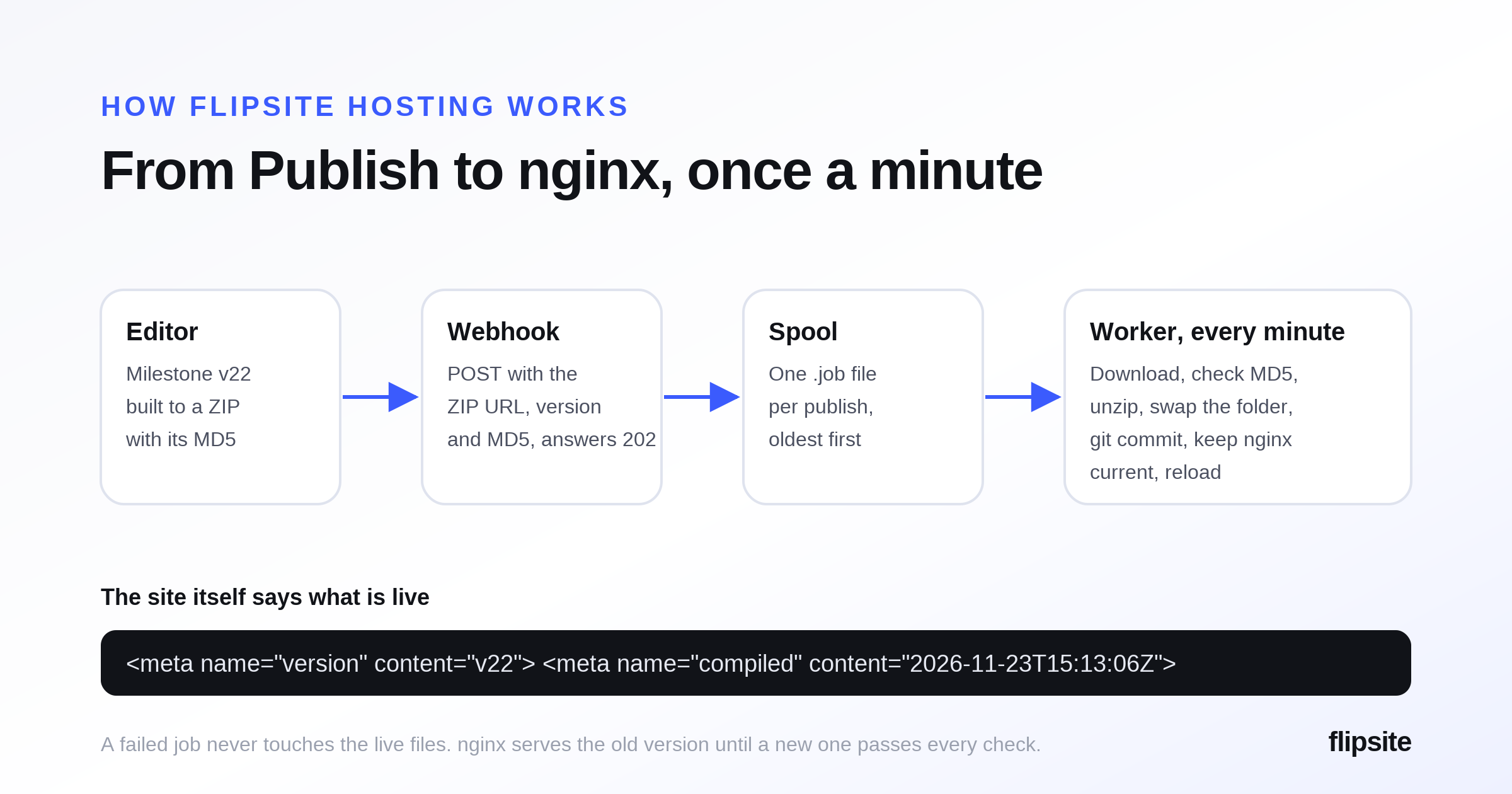
In short: a Flipsite site is built into a ZIP when you make a milestone. Where that ZIP goes is your choice: download it, push it to GitHub Pages or Netlify, let a PHP script on your web hotel pull it, or have a webhook tell your own server. This post is about the last one, because it is what runs flipsite.io and the sites we host. Publishing sends one HTTP request with the address of the ZIP and its MD5 checksum. A small script on the server writes a job file. A cron job runs every minute, downloads the ZIP, checks the checksum, unpacks it, swaps the site folder, commits the result to Git and keeps the nginx config current. The live page carries a meta tag with the version it was built from, so anyone can check what is live. The whole system is two PHP files and a cron line.
Publishing is a build, hosting is a copy
Flipsite never serves pages from a database. Every page you see on a Flipsite site is a file. When you make a milestone (v22, say), the editor compiles the whole site into HTML, CSS, images in every size, sitemap.xml, robots.txt, llms.txt and the redirect files, and stores the result as one ZIP with an MD5 checksum. That ZIP is the site. Every publish method receives the same ZIP, so a site on our hosting, on GitHub Pages and in a ZIP on your desk are byte for byte the same files. The method only decides who copies them where.
Our own hosting is the webhook method. Nothing about it is special to us: it is what you would build for your own server, and this post is the description we would have liked to read before we built it.
Step one: the webhook writes a file and stops
When you press Publish, the editor sends a POST request to the webhook address of the site. The body is JSON:
{
  "event": "flipsite.publish",
  "download": {
    "domain": "example.com",
    "version": "v22",
    "title": "New pricing page",
    "url": "https://…/example.com.v22.zip",
    "md5": "9599bdf7657b8a792cae2986cb74a82f",
    "size": 1843201
  },
  "timestamp": "2026-11-23T15:13:31Z"
}
The webhook script checks a secret in the request, checks that the event is a publish and that domain, version, URL and MD5 are there, checks that the domain looks like a domain, and writes a job file to a spool folder. It writes to a temporary name first and renames it, so a half written file is never picked up. Then it answers 202 Accepted and is done. It runs as the web server user and has no rights to touch any site. That is the point: the part of the system that is reachable from the internet can only leave a note.
Step two: the worker runs every minute
A cron job runs the worker once a minute as root. It takes a lock first, so two runs never overlap. It pulls the Git repository that holds every hosted site, even when there is no job, so the server is always in step with the repository. Then it lists the job files, oldest first, and for each one renames the file from .job to .running, does the work, and renames it to .done or .failed. A failed job keeps the error message appended to the file, and re-queuing it is renaming it back to .job.
For a domain the server has never seen, the worker first checks DNS: both example.com and www.example.com have to resolve to the server. If they do not, the job fails with that message and nothing else happens. If they do, it writes a plain HTTP nginx config, enables it, runs certbot for a Let's Encrypt certificate, and replaces the config with the HTTPS version. A new site is online with a certificate within a minute or two of the DNS being right.
Then, for every deploy:
-
1Download the ZIP from the URL in the job, with a 15 second connect timeout and two minutes for the whole file.
-
2Compute the MD5 of the downloaded file and compare it with the one in the job. On a mismatch the file is deleted and the job fails. A corrupt or half downloaded site is never unpacked.
-
3Unpack into a temporary folder. If the ZIP has one top folder, use what is inside it.
-
4Remove the site folder and rename the new one into its place. The swap is a rename, so the site is never half old and half new for longer than a file system operation.
-
5Add, commit and push the site folder to the Git repository. The commit message is the domain, the milestone title and the version: example.com - New pricing page (v22).
-
6Keep the nginx config current and reload nginx if it changed, see below.
Why every published site is a Git commit
The folder nginx serves from is a Git checkout, and every deploy is a commit. That gives us three things for free. A history of what every site looked like at every publish, with diffs. A second copy of every site off the server, so a lost server is a clone and a DNS change. And a way to see what a publish changed when a customer asks why something looks different: git show for the commit of v22.
What nginx gets
The config the worker writes for a new site is short. The site is static, so nginx only needs to know the root, the certificate, how to find a page, and how long to cache images:
map $uri $flipsite_redirect_example_com {
    default "";
    include /var/flipsite/static_hosting/example.com/redirects.ma[p];
}
server {
    listen 443 ssl http2;
    server_name example.com www.example.com;
    root /var/flipsite/static_hosting/example.com;
    error_page 404 /404.html;

    location = /redirects.map { return 404; }
    if ($flipsite_redirect_example_com) { return 301 $flipsite_redirect_example_com; }

    location / { try_files $uri $uri/ $uri.html =404; }
    location ~* \.(webp|jpg|jpeg|png|gif|ico|css|js|svg)$ { expires 365d; }

    # certificate lines from certbot
    if ($host = www.example.com) { return 301 https://example.com$request_uri; }
}
Two lines do the work for redirects. When a site is published with Redirects set to Nginx, the ZIP contains redirects.map, a list of old address to new address pairs. The map block reads it into a variable, and the if returns a real 301 when the variable is set. The glob in the include, ma[p] instead of map, makes nginx accept a site that has no redirects file yet. After every deploy the worker checks whether the config nginx uses for the domain has the map, the redirect and the error_page lines, adds what is missing, saves the old config as a backup, runs nginx -t, and puts the old one back if the test fails. nginx is reloaded only when the config or redirects.map changed. A config that someone edited by hand is kept as it is, apart from those additions.
Which version is live?
Every page Flipsite compiles carries two meta tags in its head:
<meta name="compiled" content="2026-11-23T15:13:06Z">
<meta name="version" content="v22">
So the site itself says what it is. You can check from any computer:
curl -s https://flipsite.io/ | grep 'name="version"'
The editor shows the live version in the versions panel, and it does not trust its own log of publishes for that. It reads the version meta from the live site's HTML at regular intervals, so the version marked live is the one the site is actually serving. The webhook answering 202 only means the job is queued, so if the worker fails a minute later, the panel keeps showing the version that is really online, not the one you tried to publish. The curl line above is the same check, from anywhere.
What happens when something fails
The system is built so that failures leave the old site running. A wrong secret gets a 401 and no job. A payload without an MD5 gets a 400. A DNS record that does not point at the server fails the job before any config is written. A download that times out or a checksum that does not match fails the job before anything is unpacked. An nginx config that does not pass nginx -t is put back as it was, and the deploy goes on with the files swapped and the old config. Only a push to Git can fail after the files are live, and then the site is up and the repository catches up on the next run. Every failure is a .failed file in the spool with the reason, and a line in the worker log.
The other methods, in one paragraph each
A PHP web hotel runs the same idea in reverse: you upload one script, and when you publish, Flipsite sends it a signed request, it downloads and checks the ZIP, unpacks it next to the site and swaps the files in, never touching server code or files outside the folder. The steps are in Publish to a PHP server and the script is open source at github.com/flipsite/editor-php-server-deploy.
GitHub Pages gets the files as a commit to your repository with your token, and GitHub builds and serves them. Netlify gets the ZIP through its deploy API, with _redirects for real 301s. The download method gives you the ZIP and the rest is yours.
Build your own
If you have a server, the webhook method is the one to copy. You need an endpoint that accepts the POST above, a place to queue it, and a process that downloads, verifies and swaps. The two files that run our hosting are about 650 lines of PHP together, most of it nginx handling; the deploy itself is forty lines. The payload is documented in Publish with a webhook, and the redirects can come as redirects.json if your server is not nginx or Apache. The one rule worth keeping from our setup: the thing the internet can reach only writes a note, and the thing with rights only reads notes.
Further reading

We let Claude loose on flipsite.io for an afternoon
November 20, 2026 by Henrik Karlström • 5m

AI agents can edit your website. What do they publish?
September 14, 2026 by Fredrik Rönnlund • 5m

Where to host your static website: a practical guide
October 17, 2025 by Fredrik Rönnlund • 5m

The case for static websites over dynamic ones
October 5, 2024 by Henrik Karlström • 3m